It's 2 PM on a Monday, and your call queue just spiked to 47 waiting callers. Three agents are on break, two are stuck on long calls, and your service level is dropping by the minute. By the time you pull the report, the damage is done: customers have hung up, CSAT scores have tanked, and your team is scrambling to catch up.
This is exactly what a call center wallboard software prevents.
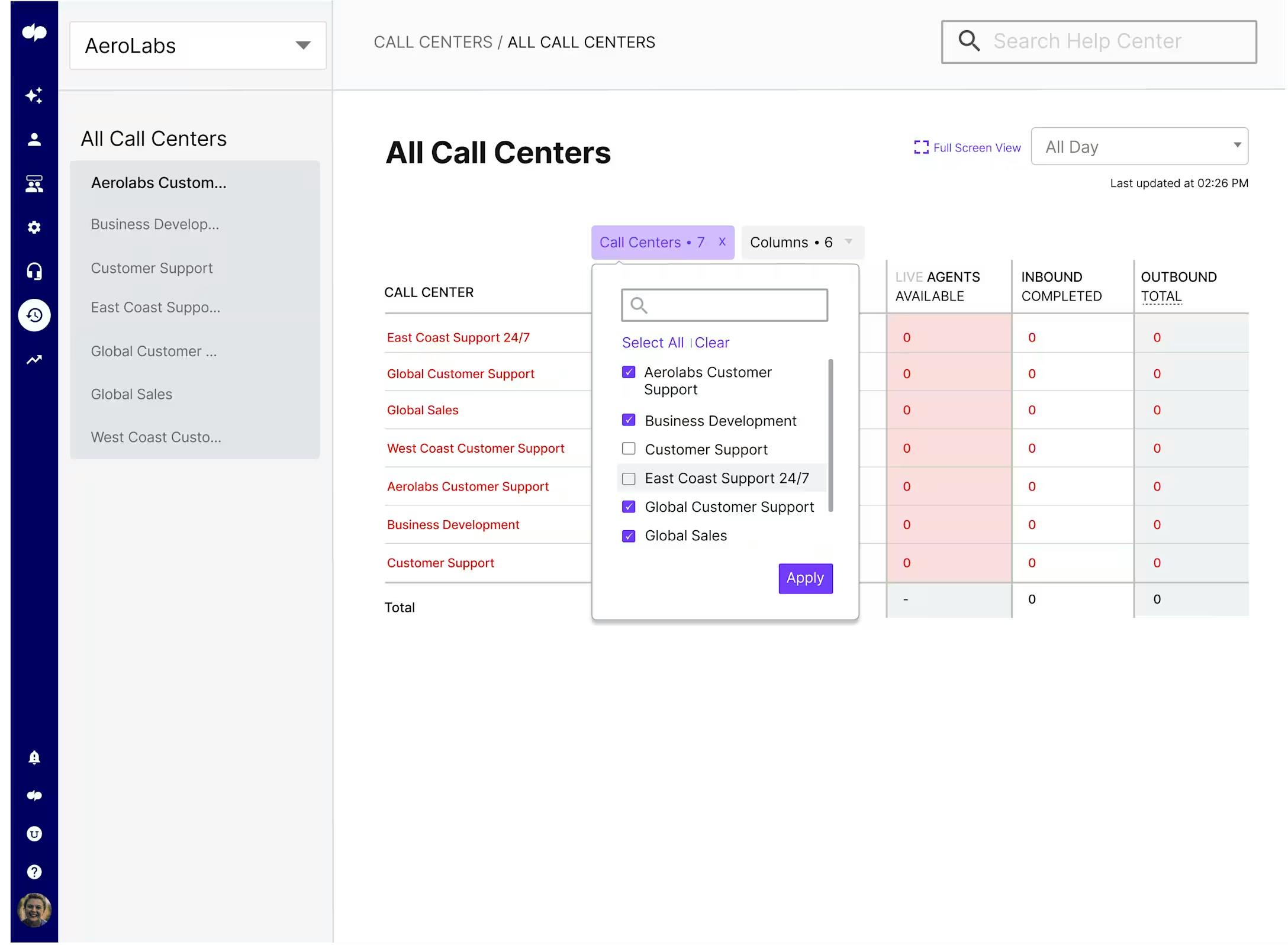
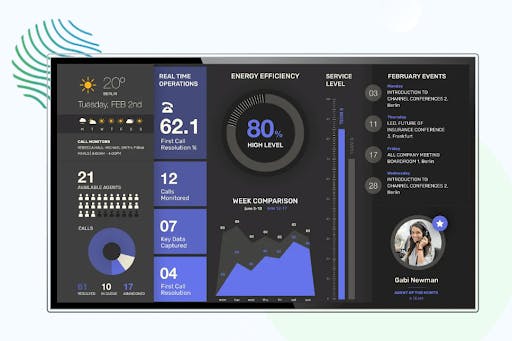
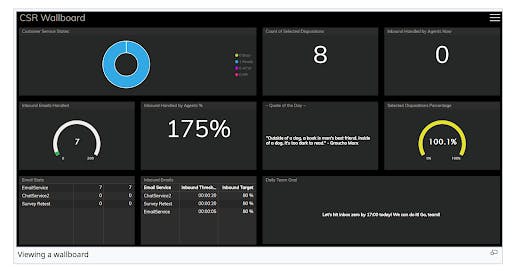
A wallboard is a real-time dashboard displaying live contact center activity, giving teams instant visibility into metrics like call volume, agent availability, and wait times as they happen. In 2026, wallboards have evolved beyond simple displays: AI integration, remote work optimization, and predictive analytics are transforming how contact centers operate.
In this guide, you'll learn what to look for in call center wallboard software, look at the top 10 solutions on the market, and understand pricing models so you can make an informed decision for your team.
TL;DR:
- Call center wallboard software provides real-time visibility into KPIs like queue status, agent availability, and service levels, enabling faster decisions and better customer experiences.
- Top solutions in 2026 include PBX.IM (best all-in-one value), CloudTalk (CRM-focused for SMBs), and KrispCall (startup-friendly).
- Pricing ranges from $19-$200+ per agent/month, with most solutions offering bundled wallboard features rather than standalone products.
What is Call Center Wallboard Software?
Call center wallboard software is a real-time visualization tool displaying live contact center metrics on screens visible to agents, supervisors, and managers. Unlike static reports or historical dashboards, wallboards update continuously, showing what's happening in your contact center right now.
Call centre wallboard solutions pull data from multiple sources: your ACD (Automatic Call Distributor), CRM, telephony system, and workforce management tools, and display it in customizable visual formats. The data is processed and visualized in real time, typically refreshing every few seconds.
What is the difference between wallboards, dashboards and analytics platforms?
Wallboards, dashboards, and analytics platforms each serve distinct purposes and knowing the difference ensures your team gets the right insights at the right time.
- Real-time, at-a-glance displays designed to be shown on large screens in call centers or offices.
- Focus on live metrics like calls in queue, agent availability, wait times, and service levels.
- The goal is immediate visibility so teams can react quickly.
- Interactive displays for managers and team leads to monitor performance.
- Combine real-time and near-real-time data, often with the ability to filter, drill down, or customize views.
- They are between wallboards and full analytics.
- Comprehensive tools for historical analysis, trend identification, and strategic decision-making.
- They allow you to query data, build custom reports, compare time periods, and uncover patterns
- Answer "why" and "what should we do next" rather than just "what's happening now."
The key distinction is timing: wallboards prioritize the present moment, enabling immediate action rather than retrospective analysis.
Key benefits of call center wallboard software:
- Enhanced visibility and transparency: Everyone sees the same metrics in real time, eliminating information silos.
- Improved agent motivation: Gamification features like leaderboards drive healthy competition and recognition.
- Faster decision-making: Supervisors spot queue buildups and respond in seconds, not hours.
- Better customer experience: Proactive management of wait times directly impacts satisfaction.
Common Use Cases for Contact Center Wallboards in 2026
- Contact centers and customer support
- Sales teams
- IT & DevOps
- Help desks & service desks
- Live call queues, wait times, agent availability, service levels, abandoned call rates
- Daily/weekly targets, deals closed, revenue progress, leaderboards, pipeline updates
- System uptime, server health, incident alerts, ticket queues, deployment status
- Open tickets, response times, resolution rates, technician workloads
- Helps teams respond faster to volume spikes, supports SLA compliance, enables better agent self-management
- Can increase motivation, encourages healthy competition, supports real-time goal tracking
- Enables faster incident detection, helps reduce downtime, supports team coordination
- Helps balance workloads, supports quicker resolution times, promotes clearer accountability
Contact Center Wallboard Software: Key Evaluation Criteria
Choosing the right wallboard software for your contact center requires careful consideration of multiple factors. The following criteria can help you compare solutions and find the best fit for your team's needs, technical requirements, and budget.
- Real-time metrics KPIs
- Customization & flexibility
- Integration capabilities
- Ease of use
- Gamification features
- Scalability
- Display options
- Pricing & value
- Customer support
- Security & compliance
- Data coverage for inbound, outbound, and omnichannel interactions
- Layout design options, widget selection, role-based views
- Connections to CRMs, telephony systems, and other business tools
- Setup time, interface intuitiveness, learning curve
- Leaderboards, contests, badges, goal tracking
- Agent capacity, multi-location and multi-team support
- TV screens, desktop, mobile, multi-screen configurations
- Cost per agent, bundled vs. add-on pricing models
- Implementation assistance, training, ongoing support quality
- GDPR, HIPAA, PCI DSS, SOC2 certifications
Top 10 Call Center Wallboard Software Solutions
Finding the right wallboard software can transform how your contact center operates. We've evaluated the leading solutions based on real-time metrics, customization, integrations, ease of use, and value for money to help you make an informed decision.
- PBX.IM
- Dialpad
- CloudTalk
- Five9
- Genesys
- KrispCall
- NovelVox
- Talkdesk
- Bright Pattern
- Nextiva
- Flexible, cost-effective wallboards with strong SIP trunking integration
- AI-powered insights and real-time coaching
- Easy setup and international calling for SMBs
- Enterprise workforce optimization
- Large-scale omnichannel operations
- Affordable option for startups and small teams
- Deep CRM integrations and custom agent desktops
- Fast deployment with strong automation
- Omnichannel support with quality management
- Unified communications with built-in analytics
- Custom pricing
- From $15/user/month
- From $25/user/month
- From $175/user/month
- From $75/user/month
- From $15/user/month
- Contact for pricing
- From $85/user/month
- Custom pricing
- From $18.95/user/month
1. PBX.IM
PBX.IM is a cloud-based VoIP and contact center platform designed for small to mid-sized businesses wanting enterprise-grade features without enterprise complexity. With customers in finance, real estate, retail, and legal, PBX.IM combines powerful wallboard capabilities with a comprehensive communication.

Key Features
- Real-Time Dashboard: Live visibility into call volume, queue status, agent availability, and service levels with instant updates.
- Customizable Wallboards: Drag-and-drop widget placement, custom layouts, and company logo support.
- Threshold-Based Alerts: Color-coded thresholds (green/yellow/red) that highlight when metrics exceed defined limits.
- Multiple Display Types: View metrics as numeric values, bar charts, line charts, or horizontal bar charts.
- Time Zone & Shift Support: Configure wallboards for different time zones and set multiple daily reset times.
- AI-Powered Call Transcription: Multi-language transcription with automatic summaries and agent to-do lists.
- Call Recording & Analytics: Inbound and outbound recording with up to 7 years retention.
Standout Capabilities
What sets PBX.IM apart is how wallboard functionality integrates into a full-featured contact center platform. You're not buying a standalone wallboard, but a real-time monitoring as part of a complete solution with call queues, IVR, auto attendant, and AI analytics.
The wallboard builder is genuinely intuitive: add widgets, drag them into position, set thresholds, and save. The stats reset feature is ideal for shift-based operations, allowing you to reset all metrics at specific times.
Best For
Established businesses and growing contact centers (5-200 agents) wanting an all-in-one solution without managing multiple vendors. Particularly strong for teams needing global coverage with local numbers in 150+ countries.
Pricing
Paid plans start from $25/month/ user and are competitively priced to scale with your needs. There is also a free version for testing out the platform’s capabilities. You can visit the PBX.IM pricing page for current rates.
Integrations
Salesforce, HubSpot, Zoho CRM, Zendesk, Microsoft Teams, Slack, REST API for custom integrations.
Pros & Cons
- All-in-one platform (no separate wallboard purchase)
- Intuitive drag-and-drop wallboard builder
- Free tier available to test
- AI transcription and analytics included
- Global coverage with 190+ countries
- Up to 7 years call recording retention
- Newer player compared to legacy vendors
- Advanced enterprise features still maturing
- Phone support on higher tiers
Customer Rating
Trustpilot: 5/5 — "We've been using PBX.IM for our mortgage broker business for two years, and it's been fantastic. The reliability and feature set surpass our previous phone company. Call transcripts and agent queueing have significantly improved our workflow."
2. Dialpad
Dialpad offers real-time dashboards with AI-powered insights, including live call transcription, sentiment analysis, and in-the-moment coaching suggestions for agents. Its wallboard features are built into the broader contact center platform, making it a strong choice for teams that want analytics and coaching tools in one plac

Key Features: Real-time dashboards, AI speech analytics, live agent coaching, omnichannel support, Google/Microsoft integration.
Standout Capabilities: "AI Moments" surfaces key conversation topics, while real-time assist cards coach agents during live calls.
Best For: Mid-market companies (50-500 agents) prioritizing AI-driven coaching.
Pricing: Contact center plans from ~$95/user/month.
Integrations: Salesforce, HubSpot, Zendesk, ServiceNow, Google Workspace, Microsoft 365.
Rating: G2: 4.4/5
3. CloudTalk
CloudTalk offers real-time dashboards that display call metrics, agent status, and queue performance. It's geared toward SMBs and prioritizes quick setup over advanced customization

Key Features: Real-time dashboard, smart dialer with CRM sync, call flow designer, TV wallboard display, international numbers in 160+ countries.
Standout Capabilities: Deep CRM integrations pull customer data directly into the agent interface alongside real-time metrics.
Best For: Sales-focused teams and SMBs (10-100 agents) relying on CRM integration.
Pricing: Lite: $19/user/mo | Essential: $29/user/mo | Expert: $49/user/mo (wallboard in Expert).
Integrations: Salesforce, HubSpot, Pipedrive, Zoho, Zendesk, Intercom, Freshdesk.
Rating: Capterra: 4.4/5
4. Five9
Five9 provides enterprise-focused wallboards with reporting across voice, chat, email, and social channels. Its dashboards integrate with workforce management tools, though pricing reflects its enterprise positioning

Key Features: Advanced real-time and historical dashboards, workforce optimization suite, predictive dialers, AI virtual agents.
Standout Capabilities: Supervisor Desktop provides comprehensive real-time visibility with agent management and routing adjustments on the fly.
Best For: Enterprise contact centers (100-5,000+ agents) with complex requirements.
Pricing: Digital: ~$119/user/mo | Core: ~$159/user/mo | Enterprise: Custom.
Integrations: Salesforce, Microsoft Dynamics, ServiceNow, Zendesk, Oracle, SAP.
Rating: G2: 4.0/5
5. Genesys
Genesys offers customizable wallboards designed for large contact centers with omnichannel needs. The platform is feature-rich but can be complex to implement and manage

Key Features: Real-time dashboards with 100+ metrics, AI predictive engagement, workforce engagement management, omnichannel orchestration, extensive marketplace.
Standout Capabilities: Industry-leading orchestration of customer journeys across channels with AI that predicts customer needs.
Best For: Large enterprises (500-10,000+ agents) requiring best-in-class capabilities.
Pricing: Cloud 1: ~$75/user/mo | Cloud 2: ~$110/user/mo | Cloud 3: ~$150/user/mo.
Integrations: Salesforce, Microsoft, AWS, Google, Adobe, ServiceNow, 400+ AppFoundry apps.
Rating: G2: 4.3/5 | Gartner Magic Quadrant Leader
6. KrispCall
KrispCall provides basic dashboards covering live calls, agent availability, and call history. It's a simple, budget-friendly option, though it may lack depth for growing teams

Key Features: Live call monitoring, call analytics, virtual numbers in 100+ countries, team collaboration, mobile apps.
Best For: Startups and small teams (1-25 agents) needing affordable, no-frills monitoring.
Pricing: Essential: $15/user/mo | Standard: $40/user/mo.
Rating: G2: 4.6/5
7. NovelVox
NovelVox focuses on CRM-integrated wallboards for platforms like Salesforce and ServiceNow. Customization options are extensive, but implementation may require more hands-on configuration

Key Features: Drag-and-drop builder, 50+ pre-built widgets, gamification with leaderboards, multi-screen support.
Best For: Contact centers adding wallboard capabilities to existing platforms (Cisco, Avaya, Genesys).
Pricing: Custom based on agent count and modules.
Rating: G2: 4.5/5
8. Talkdesk
Talkdesk features real-time dashboards with drag-and-drop customization and pre-built templates. It offers automation features, though costs can add up as you scale

Key Features: Real-time and historical dashboards, AI agent assist, workforce management, industry-specific solutions.
Best For: Mid-market to enterprise (100-2,000 agents) prioritizing AI automation.
Pricing: Essential: ~$75/user/mo | Elevate: ~$95/user/mo | Elite: ~$125/user/mo.
Rating: G2: 4.4/5
9. Bright Pattern
Bright Pattern provides omnichannel wallboards that track voice, chat, email, and social interactions. It includes quality management features, though it's less well-known than some competitors

Key Features: Omnichannel wallboards (voice, chat, email, social), scenario-based routing, quality management, mobile apps.
Best For: Mid-sized centers (50-500 agents) needing true omnichannel visibility.
Pricing: Custom; competitive with mid-market.
Rating: G2: 4.5/5
10. Nextiva
Nextiva combines unified communications with built-in analytics dashboards. Its wallboard features are part of a broader platform, which may appeal to some but feel limiting for contact center-specific needs

Key Features: Real-time dashboards, unified UC + CC, AI analytics, built-in CRM and helpdesk.
Best For: SMBs to mid-market (10-500 agents) wanting unified communications.
Pricing: Essential: ~$25.95/user/mo | Professional: ~$30.95/user/mo (contact center additional).
Rating: G2: 4.5/5
Key Features to Look for in Call Center Wallboard Software
When evaluating options for your contact centre solution, look for these essential features to ensure you get the visibility, flexibility, and value your team needs.
Real-Time Performance Metrics
Your wallboard should display: call volume and queue depth, average and longest wait times, agent availability and status, service level adherence, abandonment rates, and handle times.
Customizable Dashboards
Look for: drag-and-drop widget placement, role-based views (agent vs. supervisor), multiple layout options, color-coded threshold alerts, and saved configurations.
Gamification & Recognition
Effective gamification includes: leaderboards showing top performers, performance contests, achievement badges, personal goal tracking, and team competitions.
Multi-Channel Support
Modern wallboards should display: voice metrics alongside chat, email, and social; omnichannel queue visibility; and channel-specific KPIs.
Integration Ecosystem
Essential connections: CRM integrations (Salesforce, HubSpot, Zendesk), ACD/PBX systems, workforce management tools, and open APIs.
Alert & Notification System
Critical features: threshold-based alerts, audio/visual notifications, escalation workflows, and SMS/email alerts to supervisors.
Display Flexibility
Support for: large screen/TV displays, desktop widgets, mobile apps, and multi-screen configurations.
Historical Reporting
While wallboards focus on real-time, you still need historical context with trend analysis to spot patterns, performance comparisons over time, export capabilities for further analysis, and scheduled reports delivered automatically.
How to Set Up a Call Center Wallboard
Setting up a wallboard effectively requires planning. Here's a practical framework based on PBX.IM's approach:
Step 1: Define Your Objectives
Before configuring widgets, identify what actions you want the wallboard to drive. Are you focused on reducing wait times? Improving service level compliance? Motivating agents? Your objectives determine which metrics matter most.
Step 2: Create Your Wallboard
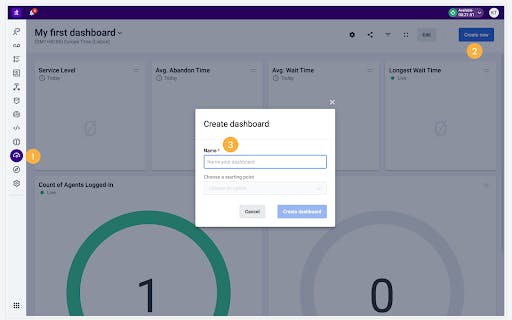
In most platforms, this involves navigating to settings, creating a new wallboard, and selecting your initial widgets. PBX.IM auto-populates with your first queue to get you started quickly. From there, you can add additional widgets through a simple interface.
Step 3: Configure Display Settings
Key configuration options include:
- Logo upload to reinforce branding
- Timezone selection to ensure metrics align with your operating hours
- Time format (12-hour or 24-hour) based on preference
- Stats reset times that match your shift schedule. or example, if you run three shifts (00:00-08:00, 08:00-16:00, 16:00-00:00), configure resets at each transition
Step 4: Customize Widget Settings
Each widget can be configured individually. Double-click any widget to access options like:
- Custom naming (e.g., "Agents Ready – Queue 1" vs. "Agents Ready – Queue 2")
- Display type selection (numeric, bar chart, line chart, horizontal bar)
- Threshold configuration to trigger color changes when metrics exceed limits
Step 5: Design Your Layout
Drag and drop widgets to create an effective visual hierarchy. Place the most critical metrics (like calls in queue and wait times) prominently. Group related metrics together. Leave enough spacing for readability from a distance.
Step 6: Publish and Share
Activate your wallboard and share the link with your team. Most platforms provide a shareable URL that can be displayed on TV screens or accessed via browser.
Pricing Guide for Wallboard Software
Pricing Models
- Per-agent pricing (most common): $10-$200/agent/month depending on features.
- Concurrent user pricing: Pay for simultaneous users, saving money with part-time agents.
- Enterprise custom pricing: Negotiated quotes for 250+ agents.
Typical Price Ranges
- Small Business (5-25 agents): $500-$2,000/month
- Mid-Market (25-100 agents): $2,000-$8,000/month
- Enterprise (100+ agents): $8,000+/month or custom
Hidden Costs to Consider
Implementation and setup fees, training costs, integration development, premium support packages, hardware (TVs/monitors), and API access fees.
ROI Considerations
Expect 5-15% productivity improvements, reduced handle time, lower abandonment rates, improved CSAT scores, and significant management time saved.
Why Choose PBX.IM Call Center Wallboard Software
Call center wallboards have become essential for modern operations. Real-time visibility into queue status, agent performance, and service levels enables the proactive management that separates great customer experiences from frustrating ones.
PBX.IM delivers this capability as part of a comprehensive cloud platform. You get intuitive wallboard building with drag-and-drop widgets, threshold-based alerts, shift-based resets, and multiple display options, all integrated with AI transcription, call recording with a 7 years retention capability, and detailed analytics.
For SMBs that don't want multiple vendors or enterprise prices, PBX.IM offers the best combination of functionality and value.
Beyond wallboards: local numbers in 150+ countries, auto attendant, call queues, IVR, and compliance with GDPR, HIPAA, PCI DSS, and ISO27001.
Get started now with PBX.IM
What are the Best Practices for Call Center Wallboard Success?
Getting maximum value from your wallboard requires more than just turning it on. Here are proven strategies:
Focus on Actionable Metrics
Every metric on your wallboard should drive a specific action. If a number goes red, someone should know exactly what to do. Avoid cluttering the display with metrics that are "nice to know" but don't prompt immediate response.
Set Realistic Thresholds
Thresholds that trigger too often become background noise. Set yellow warnings at levels that indicate attention needed, and red alerts for situations requiring immediate intervention. Review and adjust thresholds based on actual performance patterns.
Position Screens Strategically
Place wallboard displays where agents and supervisors naturally look—visible without being distracting. For remote teams, ensure desktop widgets are easily accessible and consider dedicated wallboard screens during team video calls.
Review and Iterate
Your wallboard should evolve with your operation. Schedule monthly reviews to assess which metrics are actually driving decisions, which thresholds need adjustment, and whether additional widgets would add value.
Train Your Team
Ensure everyone understands what each metric means and what actions they're empowered to take when metrics change. A wallboard that nobody acts on is just an expensive screensaver.
Call Wallboards Software FAQs
What is the best call center wallboard software?
Depends on your needs: SMBs seeking value: PBX.IM. Enterprise scale: Five9 or Genesys. CRM-focused teams: CloudTalk.
How much does wallboard software cost?
$15-200+/user/month depending on features. Many platforms include wallboards in base pricing. See the PBX.IM pricing page for affordable options.
Can I use wallboard software for remote call centers?
Absolutely. Cloud-based solutions support distributed teams with desktop and mobile apps alongside TV screen support.
What metrics should I display on a wallboard?
Top 10: calls in queue, longest wait, average wait time, service level %, available agents, agents on calls, abandoned calls, average handle time, calls handled, CSAT score.
Do I need separate wallboard software or is it included?
Most modern platforms (PBX.IM, Five9, Genesys) include wallboards. Standalone tools like NovelVox suit legacy systems needing wallboard capabilities.
How long does it take to implement wallboard software?
Cloud platforms: hours to days for basic setup. Enterprise implementations: 4-12 weeks.
Can wallboard software integrate with my existing CRM?
Yes. Most offer native integrations with Salesforce, HubSpot, Zendesk, and others, plus APIs for custom work.
Is there free wallboard software available?
Free trials are common (14-30 days). PBX.IM offers a free Start-Up tier with $5 calling credit. DIY open-source options require technical expertise.

Andreea Tilibașa specializes in content marketing and strategy for B2B tech brands. At PBX.IM, she writes about cloud telephony so that when you Google "what is SIP trunking" at 2am, you actually get a clear answer. From UCaaS and contact center tools to global voice connectivity, she covers the topics IT teams and business leaders actually care about.