
Transcribing business phone calls has evolved from a nice-to-have feature into a core business necessity. Whether it’s for documenting sales conversations, meeting compliance requirements, or revisiting client discussions, transcription ensures that no detail is lost, freeing teams from manual note-taking and transforming raw conversations into actionable business intelligence. In 2026, businesses can transcribe phone calls using three primary methods: AI-powered phone systems with built-in transcription (like modern VoIP platforms), call recording apps with automatic transcription features, or third-party transcription services that integrate with existing phone infrastructure. The most efficient approach combines automatic call recording with real-time AI transcription, eliminating manual effort while ensuring accuracy rates above 95%.
TL;DR
- Call transcription turns spoken business conversations into accurate, searchable text using AI (ASR, NLP, machine learning) for real-time or post-call analysis, training, compliance, and actionable insights.
- Different approaches suit different needs: AI-powered automation for speed, human transcription for precision, live phone transcripts for immediate decisions, and recorded calls for detailed review; smartphones and third-party apps expand accessibility.
- Professional platforms like PBX.IM combine transcription with CRM, analytics, and compliance tools, enabling secure storage, multi-speaker support, AI summaries, and seamless team collaboration.
What is Call Transcription?
Call transcription is the process of converting spoken dialogue from a phone or video call into written text using automated speech recognition (ASR) and AI language models. The goal is to create an accurate, readable, and searchable text version of a conversation that can be stored, analyzed, and shared across teams or systems.
Transcription can take place in real time, as the call happens, or post-call, by processing a recorded audio file. In both cases, the system identifies speakers, adds punctuation, and structures the conversation into clear, readable dialogue.
Businesses use call transcription for a wide range of purposes, including:
- Customer service optimization: Reviewing real conversations to identify trends, pain points, and training opportunities.
- Compliance and record-keeping: Maintaining verifiable records of calls to meet legal or regulatory requirements.
- Training and performance reviews: Helping sales, support, or legal teams learn from real interactions.
- Data analysis and automation: Feeding transcribed text into AI systems for sentiment analysis, intent detection, and keyword extraction to unlock deeper insights.
- Accessibility: Making spoken content available to individuals who are deaf or hard of hearing.
By transforming audio into structured text, call transcription turns everyday conversations into actionable data, enabling better decision-making, real-time insights, and improved customer experiences.
Call Transcription Methods and Technology
There are several methods to create a call to text transcription, and the right choice depends on a company’s specific business needs, call volumes, data sensitivity, and technical capabilities. Modern transcription relies on a combination of AI-powered automation, human accuracy, and integrated technologies that convert spoken conversations into precise, searchable text for analysis, compliance, and decision-making.
Call Transcription Methods
1. Automated Transcription
Automated transcription uses AI-powered speech recognition (ASR) and Natural Language Processing (NLP) to instantly convert audio into text. These systems are trained to recognize various accents, languages, and speech patterns, delivering results in real time or after a call has ended.
How it works: AI listens to the conversation, processes the audio, and outputs structured text enhanced with punctuation, timestamps, and speaker identification.
Pros: Fast, scalable, and ideal for large call volumes or real-time analysis.
Cons: Accuracy may vary depending on audio quality and background noise.
2. Manual Transcription
Manual transcription relies on human transcribers to listen to recorded calls and type out the conversation. It’s often used for highly critical, legal, or sensitive calls where precision is more important than speed.
How it works: Transcribers review audio recordings, interpret complex or unclear speech, and ensure the final transcript is contextually accurate.
Pros: Exceptional accuracy and contextual understanding, especially with difficult audio.
Cons: Time-consuming and more expensive than automated solutions.
3. Live (Real-Time) Transcription
This method captures and transcribes conversations as they happen, offering instant text output that agents or supervisors can use for real-time decision-making.
Best for: Customer service, contact centers, or sales teams needing immediate insights.
Advanced use: Real-time sentiment tracking, alerts, and compliance monitoring during live calls.
4. Recorded (Post-Call) Transcription
In this approach, calls are recorded first and transcribed later. It’s widely used for analysis, training, and quality assurance because it allows for detailed review and post-processing.
Best for: Businesses that prioritize accuracy, storage, and later analysis over immediate feedback.
5. Third-Party Transcription Software
These platforms integrate ASR and NLP directly with communication systems such as CRMs, VoIP tools, or contact center platforms, automating the entire transcription workflow.
Advantages: Seamless integration, centralized data management, and additional analytics features like keyword tagging, speaker labeling, and auto-summarization.
Core Technologies Behind Call Transcription
- Automatic Speech Recognition (ASR): Converts spoken words into text using AI models trained on vast audio datasets.
- Natural Language Processing (NLP): Adds contextual understanding, identifies intent, and distinguishes between speakers.
- Machine Learning: Continuously improves accuracy by adapting to accents, technical jargon, and call environments.
- Deep Learning Algorithms: Enable accurate transcription even in noisy or multi-speaker scenarios.
- On-Device Processing: Enhances privacy by performing transcription locally, minimizing data exposure and latency.
- Speaker Identification and Timestamping: Assigns dialogue to specific speakers and marks time codes for better navigation.
Native Smartphone Transcription (iOS & Android Options)
Native smartphone call transcription has evolved rapidly, but capabilities differ significantly between iOS and Android. Both platforms now offer accessible ways to convert spoken conversations into text, though accuracy, availability, and privacy features depend on device model, region, and operating system version.
Starting with iOS 18.1 (October 2024), Apple introduced built-in call recording and transcription directly within the native Phone app. This new feature leverages Apple Intelligence to transcribe conversations on-device, meaning no audio leaves the phone, a major step forward in privacy protection.
How to transcribe phone calls on an iPhone?
Here’s how to use iPhone’s built-in tools to record and transcribe calls:
- Open the Phone app and start a call.
- When prompted, enable call recording (available only where legally permitted).
- The iPhone automatically generates a live transcript using Apple Intelligence.
- After the call, open the Notes app — the full transcript and audio recording are saved automatically.
- You can search the transcript, identify speakers, or listen to specific parts by tapping the text.
Alternative option:
If the native feature isn’t available in your region, use TapeACall or record audio via the Voice Memos app, then allow Apple Intelligence to transcribe it.
How to transcribe phone calls on an Android?
Android does not yet offer a single unified call transcription experience across all devices, but several manufacturers and Google services provide partial transcription functionality.
- Google Phone app (Pixel): Offers call screening and live transcription during incoming calls.
- Google Live Transcribe: Part of Android’s accessibility suite, it provides real-time transcription for in-person conversations.
- Voice Typing (Gboard): Converts speech to text in any app that supports typing.
- Google Translate: The “Transcribe” mode captures and transcribes speech in different languages in real time.
- Third-party apps: For complete call recording and transcription, Android users often rely on apps like Cube ACR, which use conference call recording technology to capture both sides of a conversation.
Limitations:
Native Android options may vary by brand (e.g., Samsung, Pixel, Xiaomi), and full call transcription often requires third-party apps. Audio clarity, background noise, and connection quality can affect accuracy.
Professional AI-Powered Transcription Business Solutions
For organizations managing high call volumes, AI-powered transcription business solutions deliver a complete, automated workflow, from call recording to actionable insights. These platforms go beyond simple speech-to-text conversion, offering integrated tools for compliance, collaboration, and customer intelligence that directly impact business outcomes.
Automatic Recording
Every business call is automatically captured without manual activation, ensuring no conversation is missed. Whether inbound or outbound, the system logs, records, and securely stores all audio data in compliance with privacy regulations.
AI-Powered Transcription
Advanced speech-to-text engines powered by artificial intelligence provide high accuracy, even with complex business terminology or multiple speakers. The AI adapts to each company’s language patterns, jargon, and tone, delivering transcripts that read naturally and precisely.
Real-Time Processing
Get instant access to transcripts immediately after the call ends. Real-time transcription enables faster decision-making, allowing managers and teams to identify key topics, customer concerns, or opportunities without delay.
CRM Integration
Seamless integrations with major platforms like Salesforce, HubSpot, and Pipedrive automatically attach transcripts, summaries, and call insights to client profiles. This eliminates manual updates and ensures all communication data stays in one place.
Team Collaboration
Empower your team with shared transcript access, commenting features, and workflow integration. Managers can highlight key points, tag team members, or assign follow-up actions directly within the platform, turning every call into a coordinated next step.
Compliance Features
Maintain complete control over data with secure cloud storage, audit trails, and custom retention policies. Every recording and transcript meets enterprise-grade compliance standards such as GDPR, SOC 2, and ISO 27001.
Quality Monitoring
Supervisors and quality managers gain real-time visibility into call performance. Built-in analytics allow them to review agent transcripts, evaluate communication quality, and use real examples for training and coaching.
Summaries & Key Actions
Turn every customer interaction into opportunity. AI automatically generates concise summaries, action items, and sentiment highlights, helping teams follow up effectively and convert more calls into clients.
Language Support
Support global operations with multi-language transcription and translation, enabling seamless collaboration across international teams. Transcripts can be generated in multiple languages with high contextual accuracy, empowering cross-border communication and analysis.

How to Transcribe a Phone Call with PBX.IM?
PBX.IM phone call transcription services make easy to create accurate transcripts from recorded calls, allowing teams to quickly review conversations, confirm next steps, and document key decisions — without listening to full audio recordings. Below is a step-by-step guide to enabling and using call transcription.
Step 1 — Enable Call Transcription
Before you begin, ensure transcription is turned on for your workspace.
- Navigate to Settings → General
- Select the Transcriptions tab
- Toggle Enable Transcriptions to ON
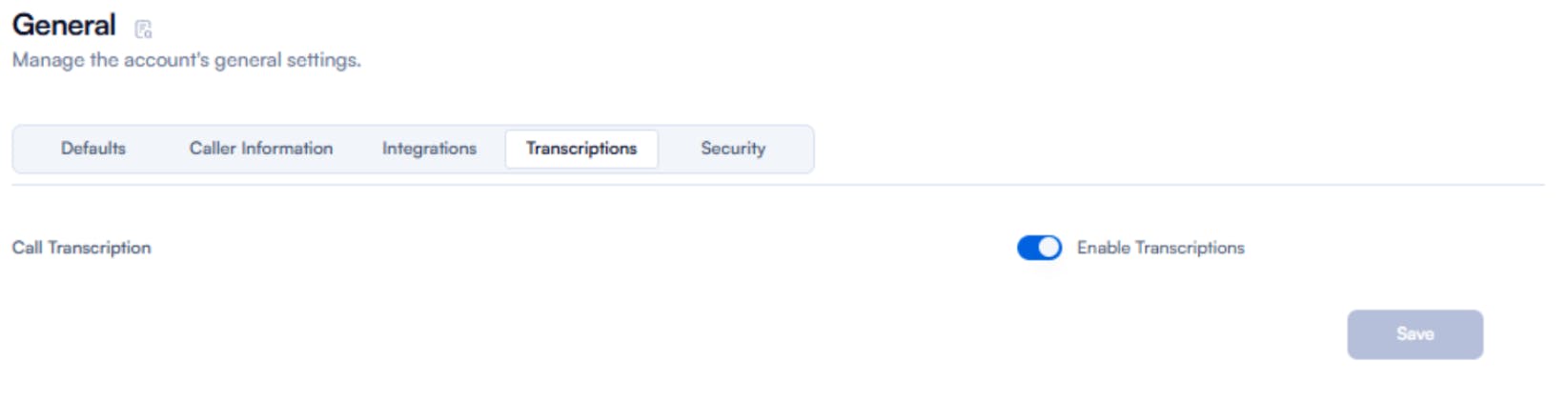
Once enabled, users with the right permissions can transcribe calls directly from the call logs.
Step 2 — Generate a Transcription
You can manually transcribe any eligible recorded call.
- Open the Call Logs section from the left sidebar
- Find the call you want to review
- Click the Transcription icon on the right side of the call row
The transcription will begin processing immediately. Progress is shown in real time.
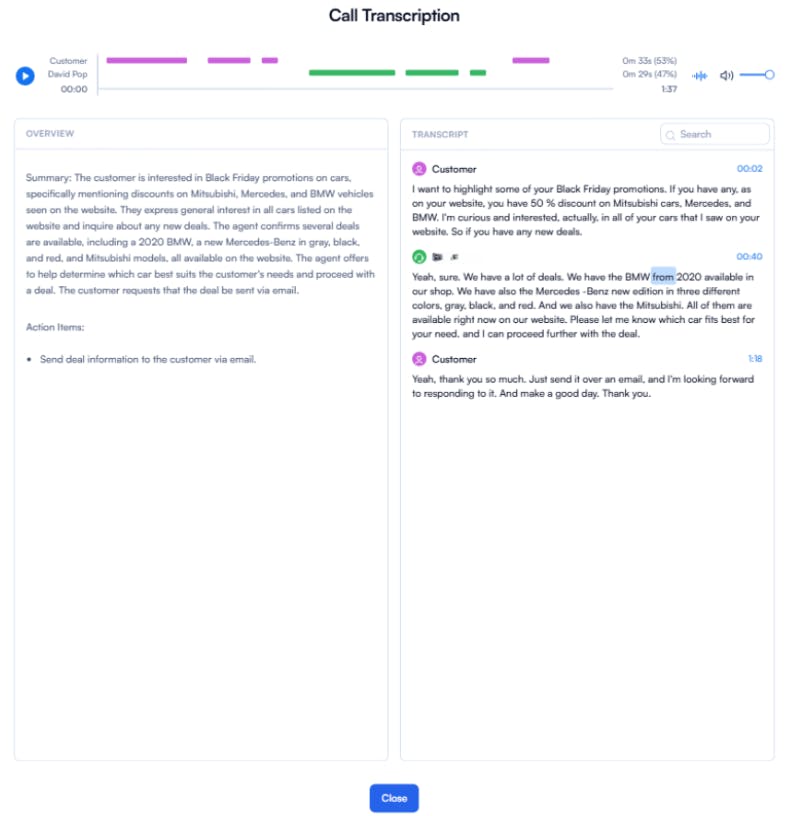
Step 3 — Reviewing the Transcript
The Transcription Viewer provides all the tools needed for analysis, coaching, and documentation.
Speaker Identification
- Agent speech is highlighted in pink
- Customer speech is highlighted in green
- Makes it easy to track conversation flow
Word-Level Playback
- Click any word to play the audio from that exact moment
- No manual seeking required
Conversation Transcript
- A time-aligned transcript of the full call
- Useful for training, QA, compliance, and dispute resolution
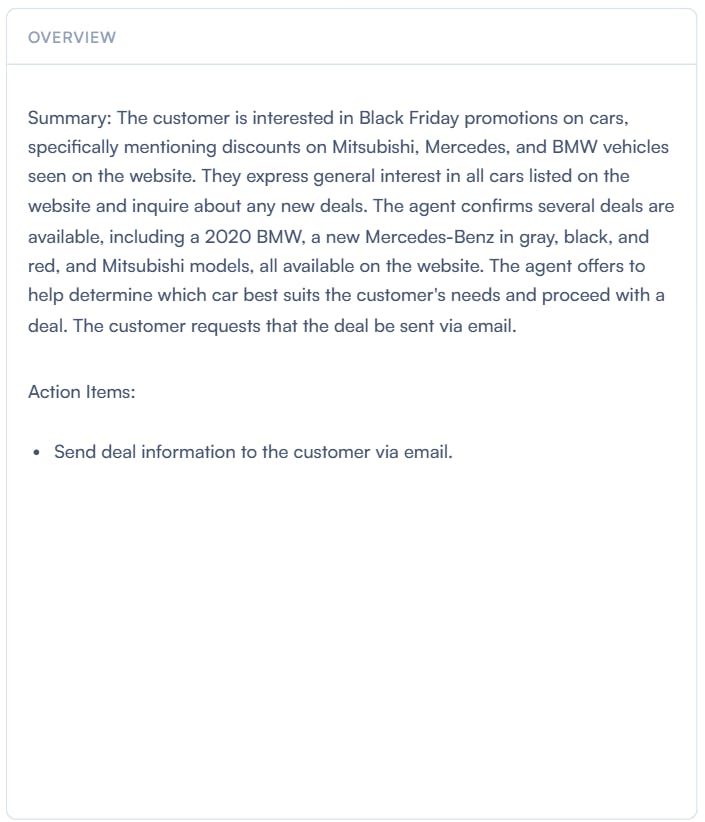
AI Summary & Action Items
Displayed in the right-hand panel:
- Key topics and discussion highlights
- Automatically generated follow-up actions
- Helps reduce post-call documentation time
Benefits of Transcribing Calls with PBX.IM
Quick Setup and Onboarding
Transcription can be enabled in just a few steps, with no technical configuration or external tools required. Teams can start generating transcripts immediately after activation.
Automatic Transcription Availability
Once transcription is enabled, authorized team members can trigger and access transcripts directly from the call logs. There is no need for manual recording setup or call-by-call activation.
Role-Based Permissions and Access Control
Administrators can define which users can transcribe calls, view transcripts, export summaries, or access specific call records. This ensures privacy, compliance, and controlled data visibility across departments.
CRM and Workflow Integration
Transcripts, summaries, and identified action items can be pushed directly to CRM platforms such as Salesforce, HubSpot, and Zoho. This helps sales and support teams keep customer records complete and up to date without manual data entry.
Mobile Support for Distributed Teams
PBX.IM’s mobile app allows users to access recorded calls and transcripts remotely. Field agents, traveling sales reps, and hybrid support teams can stay aligned without needing desktop access.
Improved Cross-Team Collaboration
Transcripts can be shared easily within teams for training, performance reviews, dispute resolution, and quality assurance. Managers can quickly identify moments that need attention without reviewing entire recordings.
Example of a Phone Call Transcript
PBX.IM’s Call Transcription feature not only generates accurate transcripts but also presents them in a structured, easy-to-read format. This allows teams to quickly review conversations, identify action items, and analyze discussions for training or customer follow-ups.
Below is an example of how a transcribed call to text might appear in PBX.IM:
Other Business Transcription Platforms
When selecting a call transcription solution, it’s important to compare features, pricing, and user experiences. Here are some other popular platforms we reviewed in our Best Call Transcription Software blog post:
Aircall
Aircall focuses on call routing, queue management, and CRM integration, enabling sales and support teams to track leads and monitor performance. Its transcription capabilities help teams quickly review conversations and maintain an organized call workflow.
Trint
Trint offers advanced transcription features, including searchable transcripts, automatic summaries, and action point extraction. Its multilingual support makes it suitable for multinational teams and organizations that deal with media-heavy workflows.
Dialpad
Dialpad provides real-time coaching for sales calls, actionable analytics dashboards, and multilingual transcription. It is designed to improve sales performance and customer experience, while also simplifying team onboarding and call review processes.
Vonage
Vonage offers flexible VoIP and communication APIs, with call recording and transcription integration capabilities. It is developer-friendly and highly customizable, suitable for teams that need adaptable solutions rather than plug-and-play software.
Legal Compliance for Phone Call Transcription Services
When implementing call transcription in your business, it’s critical to understand and adhere to legal and regulatory requirements. Compliance ensures that recorded conversations are secure, private, and legally defensible.
US State-by-State Consent Laws
In the United States, call recording regulations vary by state. Some states require one-party consent, meaning only one participant needs to agree to the recording, while others require two-party or all-party consent. Businesses must verify local laws before recording or transcribing calls to avoid legal penalties.
International Compliance
For businesses operating globally, call transcription must comply with international privacy regulations. Examples include:
- GDPR (General Data Protection Regulation) in the EU, which mandates clear consent, secure data handling, and rights for individuals to access or delete their data.
- PIPEDA (Personal Information Protection and Electronic Documents Act) in Canada, which governs the collection, use, and disclosure of personal information during communications.
Industry-Specific Regulations
Certain sectors face stricter rules regarding recorded communications:
- Healthcare: HIPAA requires the protection of patient information in any call transcription.
- Financial Services: Compliance with regulations such as FINRA or SEC rules is essential for retaining and securing records of client interactions.
PBX.IM Compliance Features
PBX.IM provides built-in tools to help businesses maintain compliance:
- Consent Notifications: Automatic alerts inform participants when a call is being recorded and transcribed.
- Secure Storage: Transcriptions are encrypted and stored securely to prevent unauthorized access.
- Audit Trails: Detailed logs track who accessed transcripts and when, supporting regulatory audits and internal governance.
By combining a clear understanding of legal requirements with PBX.IM’s compliance features, businesses can confidently implement call transcription while protecting customer privacy and meeting industry regulations.
Why Choose PBX.IM for Professional Call Transcription?
PBX.IM transforms every business conversation into searchable, shareable, and actionable records that empower teams to make better decisions, improve customer interactions, and streamline workflows.
With PBX.IM, you gain:
- High-Accuracy AI Transcription: Speaker separation, time-aligned text, and automated summaries ensure every detail is captured.
- Seamless Integration: Connect transcripts with CRMs, project management tools, and analytics platforms to drive operational efficiency.
- Enhanced Team Collaboration: Share, comment, and track action items directly from transcripts to improve productivity across sales, support, and operations.
- Compliance and Security: End-to-end encryption, audit trails, and built-in consent notifications ensure your call data meets industry and legal requirements.
- Remote and Mobile Access: Teams can review and act on transcripts anywhere, supporting distributed and hybrid work environments.
PBX.IM doesn’t just transcribe calls—it turns your conversations into business intelligence that drives faster follow-ups, better client service, and measurable results.
How to Transcribe Phone Calls FAQs
How do I transcribe calls for my business?
You can transcribe business calls using AI-powered transcription platforms like PBX.IM, which automatically generate accurate, time-aligned transcripts with speaker separation and summaries. Alternatively, native smartphone options or third-party apps can be used for smaller teams or individual needs.
Is it legal to transcribe phone calls without permission?
Call recording and transcription legality depends on your location. Some regions require one-party consent, while others require all-party consent. Always check local laws before recording or transcribing calls to ensure compliance.
How accurate is the iPhone call transcription?
iPhone’s built-in transcription features (iOS 18.1+) provide high accuracy for clear, one-on-one conversations. Accuracy may decrease in noisy environments, with multiple speakers, or with strong accents. Using AI-assisted apps or PBX.IM improves reliability for business-critical calls.
Can Android phones automatically transcribe calls?
Some Android devices support live transcription via apps like Google Live Transcribe or Google Translate. Full phone call to text transcription usually requires third-party apps such as Cube ACR. Accuracy varies by device and audio quality.
What is the best app to transcribe phone calls?
The “best” app depends on your needs. For professional business use, PBX.IM provides AI-powered transcription with speaker separation, CRM integration, and actionable summaries. For individual or mobile use, TapeACall (iPhone) or Cube ACR (Android) are popular alternatives.
How do I get a transcript of a recorded phone call?
If your call is recorded, upload the audio file to a phone transcription service or platform. PBX.IM allows you to generate transcripts directly from call logs, separating speakers, time-aligning text, and extracting summaries automatically.
Can you transcribe WhatsApp voice calls?
Direct transcription of WhatsApp voice calls is generally not supported by native apps. To transcribe, you need to record the call using a third-party tool (where legally allowed) and then upload it to a transcription service.
How much does a professional call transcription cost?
Pricing depends on volume, features, and provider. PBX.IM offers scalable plans based on call volume and team size. Other platforms may charge per transcription minute, per user, or per subscription tier. Costs typically range from $25–$50/month for small teams to higher for enterprise solutions.
Can I transcribe conference calls with multiple speakers?
Yes. Advanced transcription platforms like PBX.IM and Trint can identify multiple speakers, label them correctly, and generate actionable summaries and key points. Accuracy depends on audio quality and platform capabilities



David Pop is a copywriter and marketing strategist specializing in VoIP and business communication solutions. At PBX.IM, he leverages his expertise in cloud telephony and modern communication technologies to craft clear, insightful content that helps business leaders and IT professionals understand and optimize their systems. With extensive experience in marketing and content development, David brings precision and clarity to complex topics, ensuring businesses can make informed decisions about their communication infrastructure.